Migrating Authentication Methods

With September finally upon us that can only mean one thing, that authentication methods are being migrated to the new combined policies at the end of the month! That's less than 30 days away!
In case you need a reminder, on the 30th September the legacy multi-factor authentication and self-service password methods will become deprecated and settings will be managed within the combined authentication methods policies.
What do these policies do?
Simply put, these policies are all responsible for setting which methods are available to your users to utilise as multi-factor or prove they are who they say they are when it comes to working through the self-service password reset process.
What's changing?
Currently, these methods are managed in two different places;
- legacy multi-factor authentication settings are located within the 'per-user mfa' section and then service settings within the verification options heading.
- self-service password settings are found within Entra > Password Reset and then Authentication Methods
From the 30th September these will be managed within the new location: Entra ID > Authentication Methods > Policies
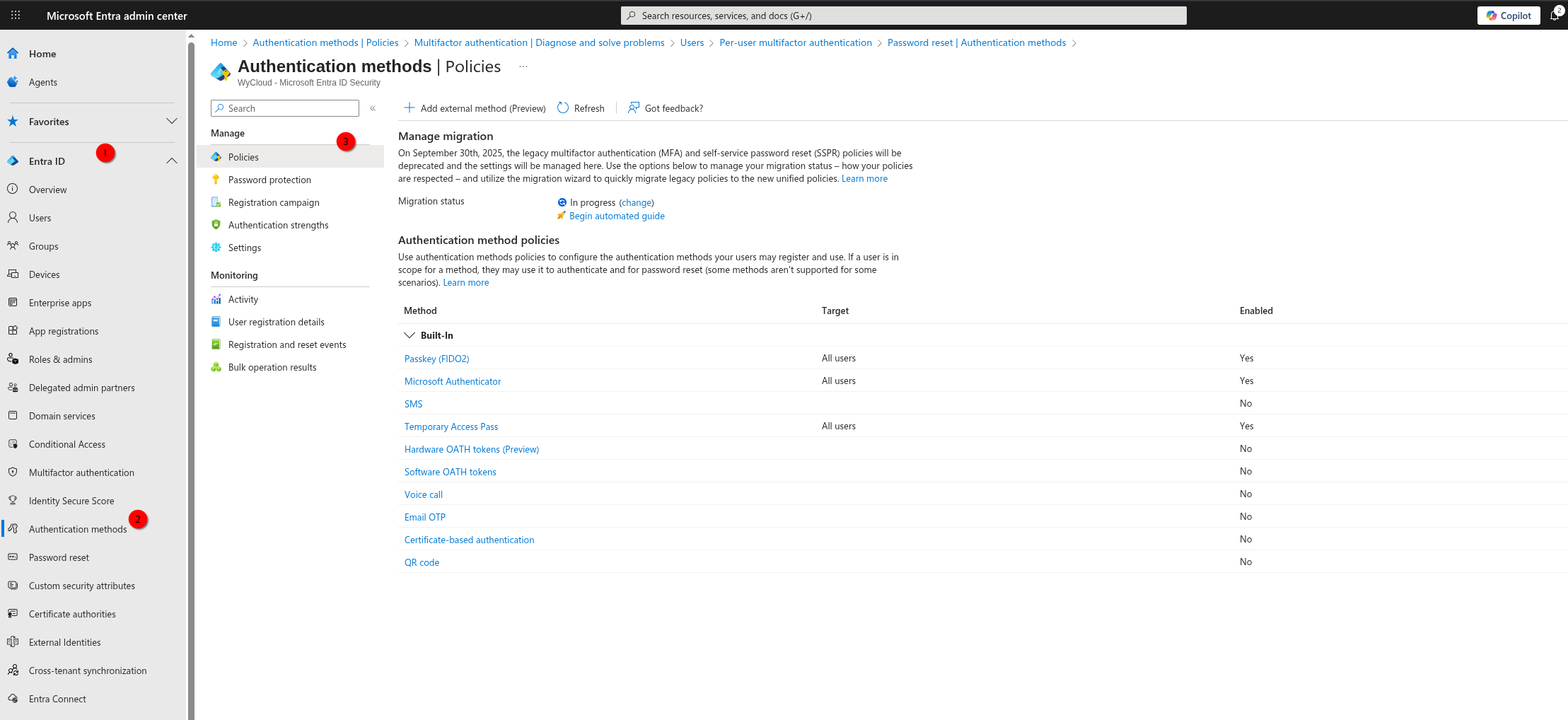
What do you need to do?
Well, technically, nothing. That's right, technically speaking the old methods will be migrated and considered deprecated and the new methods will become the source of truth.
However, it is strongly recommended that you perform the migration yourself ahead of time to stay in control of the policies used in your organisation and to take the time to review and modernise the options on offer to your users, favouring more secure authentication methods such as passwordless or push notifications.
Reviewing your supported authentication methods alongside making a push for modern authentication methods such as passwordless can be a great way to approach two projects at once!
How do you migrate?
As the deadline approaches Microsoft have made it as easy as possible to migrate your methods to the combined policies, there is now an automated wizard to work through if you want. However, you can also take a more manual approach if you're a sucker for pain... I guess.
Manual approach
Thankfully it's still a rather straight forward process if you go down the manual route.
-
Navigate to the respective legacy policy locations that were highlighted earlier in this post and make a note of all of the methods that are currently enabled within your tenant for both mfa and sspr.
-
Once you have your list of currently active policies across the legacy settings for mfa and SSPR you can make decisions of whether you still want to support these methods going forward.
-
So by now you should have a list of methods you want to support in the new combined policies, perfect. It's time to enable them accordingly and scope/configure them.
-
First things first, check your migration status. If it's set to 'Not started' you'll want to set this to 'Migration in process'.
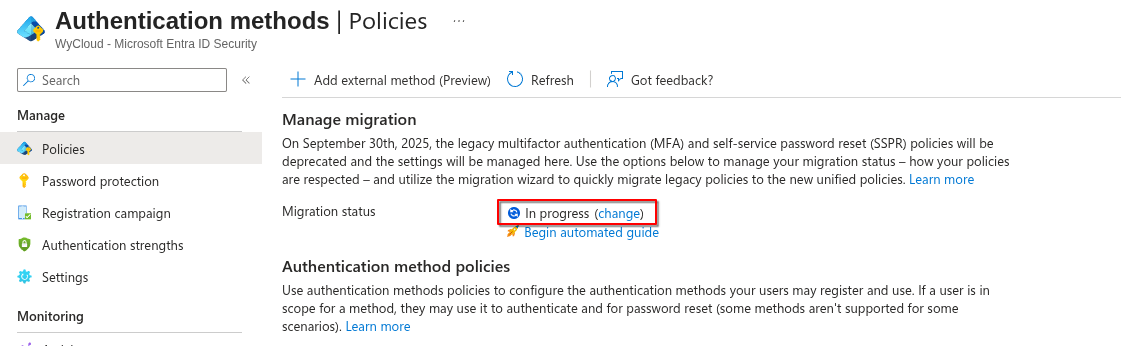
This will ensure that your legacy settings and new methods are respected.
-
Enable the new authentication methods and make them available to your users. Each method may have it's own configuration settings, feel free to take a look and configure these as required for your organisation.
-
Once the new settings are enabled, tested and confirmed working. Disable the old policies by deselecting them. Once complete, change your migration status to 'Migration complete'.
If you disable a legacy method but do not support it in the new authentication methods and it's the only method a user has registered to their account they may get locked out/require re-registration.
Automated approach
If the thought of locating your current policies and working out what to keep is too much to handle, thankfully Microsoft have put together an automated guide. This can be found within the new authentication methods page and is located within the text Begin automated guide.
This guide will provide a few links where you can review your current settings if you wish, but more importantly if you click Next to review the proposed policies it will present appropriate policy settings that can be deployed with one click. The status of these will depend on your current settings.
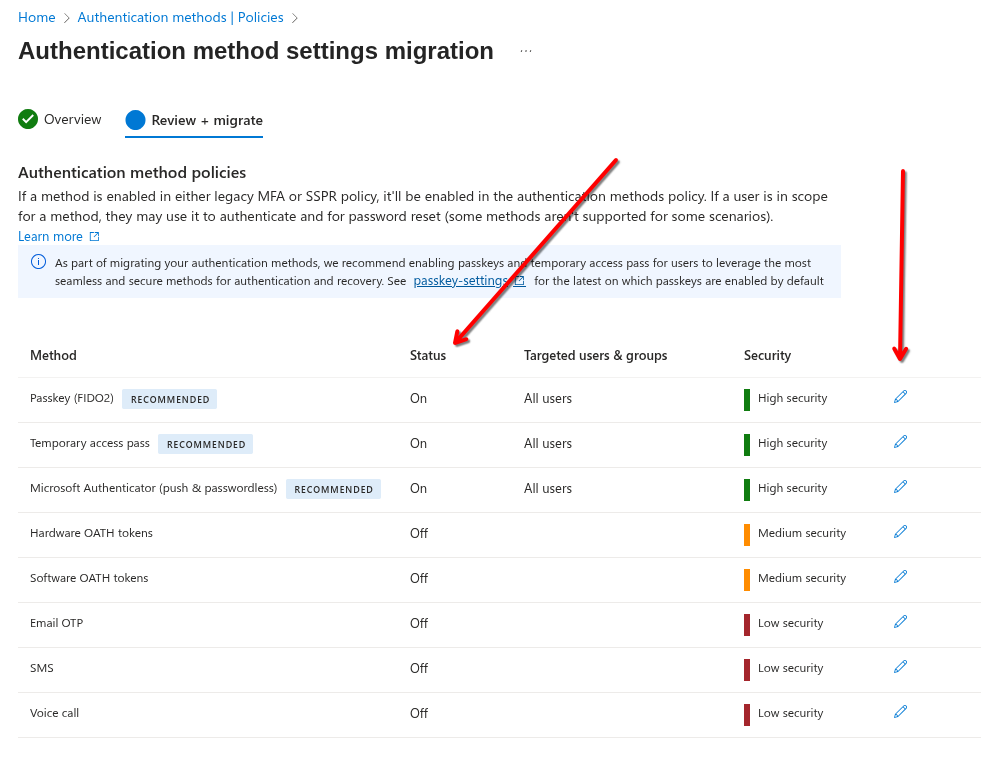
You'll notice from the above screenshot that the wizard provides the status of the policy as well as an option to edit the settings of each method. This will let you alter if you want to use the method or if you want to tailor which users it's available to.
Clicking Migrate will simply complete the process and migrate your authentication methods to the new combined methods!
Final Gotcha's
Whilst that sounded pretty straightforward, there are a few gotchya's that it's worth being aware of:
- Firstly, these policies just make the methods available to your users, they do not enforce them. To do this you'd need to deploy Conditional Access policies.
- Not all of the existing and legacy methods are supported in the new combined policies, e.g. Security questions. For a full mapping of the old > new, please see the 'Manual Migration' section of the following MS Learn page.
Summary
That's it, authentication methods are now using combined policies which are managed in one place for both multi-factor authentication and self-service password resets. Awesome.
Once again, it is strongly strongly recommended that you conduct the migration ahead of the forced date to keep you in control, also during this process it is wortwhile reviewing the methods that you currently support and aim to migrate to modern authentication methods that are considered more secure and even phishing resistant!